
WCF中几个容易忽略的知识点
近来看WCF相关资料 发现之前一些没太关注或者有些错误认识的知识点,有些也貌似不怎么常用。于是整理了这一则笔记。
1、 WCF中的绑定
可以通过绑定无参数构造函数实例化绑定,然后调用CreateBindingElements获取到此种绑定的绑定元素。
WSHttpBinding httpBinding = new WSHttpBinding();
BindingElementCollection collection = httpBinding.CreateBindingElements();
foreach (var element in collection)
{
    Console.WriteLine(element.GetType().FullName);
}
输入如下:
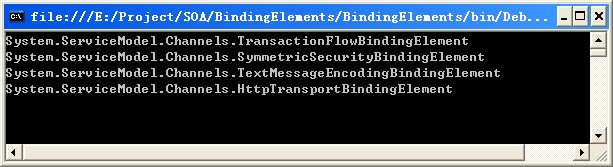
如果对WSHttpBinding 更换一下构造函数 ,如:
httpBinding = new WSHttpBinding(SecurityMode.Transport);
输出结果如下:
 如果对绑定指定一些配置,如安全配置,则它的绑定元素可能与调用无参数构造函数实例化对象调用CreateBindingElements获取到的绑定元素不同。也就是说对于同一绑定,使用不同的配置可以更改它的绑定元素类型;不管采用何种配置,对绑定来说传输绑定与编码绑定元素这两个是必须的。
2、终结点契约配置
配置中的契约contracts不是契约接口的完全限定名,而是ServiceContractAttribute中ConfigurationName指定的名称。如果没有ConfigurationName配置,那么contracts的完全限定名与ConfigurationName指定的名称相同。
3、 UnHandler处理器
如果在WCF中需要一个能处理所有消息的方法,而不关心SOAP消息的Action。那么操作方法的参数可以指定为Message。这种服务操作在WCF中被称为UnHandler处理器。这种情况下,参数应为Message;返回值为void或者Meaage;
OperationCOntractAtrribte的Action设置为"*"
4、WCF序列化中Dos攻击
WCF使用的序列化器DataContractSerializer在对数据契约进行序列化或者反序列化时,为了防止Dos攻击,在
DataContractSerializer中使用MaxItemsInObjectGraph设置了每次序列化得对象数量。实际使用的时候可以在实现服务
契约接口的服务加上ServiceBehavior标签中进行设置。如[ServiceBehavior(MaxItemsInObjectGraph = 60)];或者在serviceBehavior的配置中由dataContractSerializer指定。如:
<behavior name="serviceBehavior">
  <dataContractSerializer maxItemsInObjectGraph="1000"/>
</behavior>
5、泛型数据契约问题
泛型为OO里的一种概念,而服务是基于SOA的,它没有重载等概念。WCF的默认序列化器DataContractSerializer对
泛型数据契约的序列化,生成的XML默认的根节点元素名称为:类型名+泛型名1+泛型名2+...+哈希码。
可以通过指定模板的形式指定DataContractSerializer序列化后的根节点名:{0}{1}...{n}{#}。当然如果能保证数据契约名称不重复,也可以直接在DataContract中通过Name指定。
6、自定义集合数据契约类型
自定义集合数据契约:定义类,实现集合接口。如下定义:
public class TeacherCollection : IEnumerable<Teacher>
{
    private readonly IList<Teacher> teachers = new List<Teacher>();
    public TeacherCollection()
    {
    }
    public TeacherCollection(IList<Teacher> _teachers)
    {
        teachers = _teachers;
    }
    public void Add(Teacher teacher)
    {
        teachers.Add(teacher);
    }
    #region IEnumerable<Teacher> 成员
    public IEnumerator<Teacher> GetEnumerator()
    {
        return teachers.GetEnumerator();
    }
    #endregion
    #region IEnumerable 成员
    IEnumerator IEnumerable.GetEnumerator()
    {
        return teachers.GetEnumerator();
    }
    #endregion
}
在定义契约接口时,可以用自定义集合数据契约。它和IList<Teacher>的区别是:IList<Teacher>中Teacher才是数据契约,IList<Teacher>是数据契约的集合,而TeacherCollection是将整个集合对象最为数据契约。在WCF的默认的序列化器对TeacherCollection和IList<Teacher>的序列化的结果是相同的。
自定义集合契约,如果实现IList接口,则可以不需要添加Add,如果实现了IEmurable接口,则需要Add方法,并且需要有无参构造函数。为了简化Add方法与构造函数可以让自定义集合契约直接实现List<T>。
对于自定义集合契约,WCF可以直接使用CollectionDataContract将其标记,泛型类T无需标记为DataContract。如下:
[CollectionDataContract(Name = "TeacherList", ItemName = "TeacherEntry", Namespace = "cnblogs.com")]
public class Collection<T> : List<T>
{
    private readonly IList<Teacher> teachers = new List<Teacher>();
}
7、数据契约代理
数据契约代理实现了IDataContractSurrogate。在WCF中,它可被用于WCF默认的序列器
DataContractSerializer中,用于将数据契约类与其他相似类型的转化。以下实现Contract类型与数据契约Employee之间
的转化。
示例代码如下:
Contract类:
public class Contract
{
    public string FullName { get; set; }
    public string Sex { get; set; }
}
数据契约Employee:
[DataContract]
public class Employee
{
    [DataMember]
    public string FirstName { get; set; }
    [DataMember]
    public string LastName { get; set; }
    [DataMember]
    public string Gender { get; set; }
}
实现IDataContractSurrogate接口:
class ContactSurrogate : IDataContractSurrogate
{
    #region IDataContractSurrogate 成员
    public object GetCustomDataToExport(Type clrType, Type dataContractType)
    {
        return null;
    }
    public object GetCustomDataToExport(System.Reflection.MemberInfo memberInfo, Type dataContractType)
    {
        return null;
    }
    public Type GetDataContractType(Type type)
    {
        if (type==typeof(Contract))
        {
            return typeof (Employee);
        }
        return type;
    }
    public object GetDeserializedObject(object obj, Type targetType)
    {
        Employee employee = obj as Employee;
        if (employee==null)
        {
            return obj;
        }
        return new Contract {FullName = employee.FirstName + employee.LastName, Sex = employee.Gender};
    }
    public void GetKnownCustomDataTypes(System.Collections.ObjectModel.Collection<Type> customDataTypes)
    {
    }
    public object GetObjectToSerialize(object obj, Type targetType)
    {
        Contract contract = obj as Contract;
        if (contract == null)
        {
            return obj;
        }
        return new Employee
        {
            FirstName = contract.FullName.Split(" ".ToArray(), StringSplitOptions.None)[0],
            Gender = contract.Sex,
            LastName = contract.FullName.Split(" ".ToArray(), StringSplitOptions.None)[1]
        };
    }
    public Type GetReferencedTypeOnImport(string typeName, string typeNamespace, object customData)
    {
        return null;
    }
    public System.CodeDom.CodeTypeDeclaration ProcessImportedType(System.CodeDom.CodeTypeDeclaration typeDeclaration, System.CodeDom.CodeCompileUnit compileUnit)
    {
        return typeDeclaration;
    }
    #endregion
}
使用ContactSurrogate进行序列化与反序列化的方法:
public static void Serializer<T>(T instance,string fileName,IDataContractSurrogate dataContractSurrogate) { DataContractSerializer serializer=new DataContractSerializer(typeof(T),null,Int32.MaxValue,false,false,dataContractSurrogate); using(XmlWriter xmlWriter=XmlWriter.Create(fileName)) { serializer.WriteObject(xmlWriter, instance); } Process.Start(fileName); } public static T DeSerializer<T>(string fileName,IDataContractSurrogate dataContractSurrogate) { DataContractSerializer serializer = new DataContractSerializer(typeof(T), new List<Type>(), Int32.MaxValue, false, false, dataContractSurrogate); using (XmlReader xmlReader=XmlReader.Create(fileName)) { object obj = serializer.ReadObject(xmlReader); return (T) obj; } }
现在对数据契约Employee使用Serializer<T>进行序列化,然后将它序列化后的文件使用DeSerializer<T>将它反序
列化成反序列化为Contract对象。
Employee employee = new Employee {FirstName = "yongbo", Gender = "male", LastName = "Tao"};
ContactSurrogate contactSurrogate = new ContactSurrogate();
      Tools.Serializer(employee, @"C:\DataContractSurrogate.txt", contactSurrogate);
      Contract obj = Tools.DeSerializer<Contract>(@"C:\DataContractSurrogate.txt", contactSurrogate);
      Console.WriteLine(string.Format("{0} 类型为:{1}。FullName is {2},Sex is {3}",obj,obj.GetType().FullName,obj.FullName,obj.Sex));
输出如下:

